Notices
RehabAlpha is still under active development. It is not yet HIPAA compliant and should only be used with dummy data.
A notice is an actionable signal that something in your therapy organization needs attention. Notices are designed to surface compliance risks, billing issues, and time-sensitive documentation so they can be addressed before they become problems.
Think of notices as a dynamic, role-aware to-do list for your organization.
Data model
Notices are generated and stored at the organization level.
A single notice may be relevant to many people, but it exists only once at the organization level.
How notices are generated
Every hour on the hour, RehabAlpha scans your organization’s data looking for:
- Compliance issues
- Billing risks
- Documents that are due or overdue
If an issue is detected, RehabAlpha generates (or updates) the relevant notice for the organization.
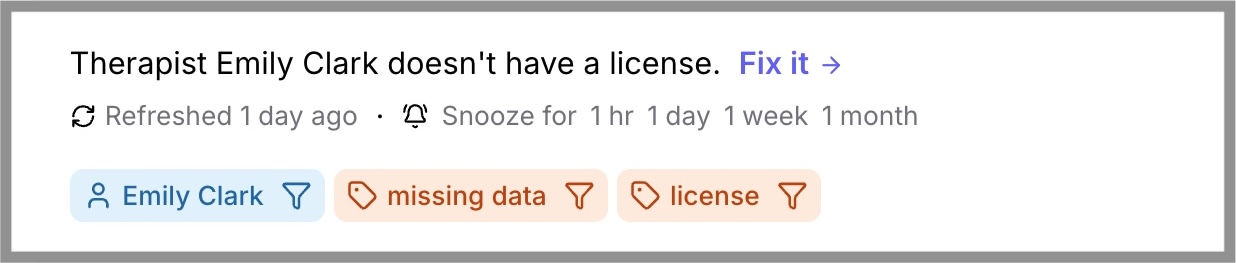
Each notice includes:
- A clear description of the issue
- A Fix it link that takes you directly to the relevant screen
- One or more tags (facility, person, category, etc.)
Subscriptions and visibility
Each person in an organization has zero or more subscriptions. Subscriptions determine which notices appear in that person’s dashboard.
If a notice matches one or more of a person's subscriptions, that notice will appear in the person's dashboard. This allows each person to see only the notices that matter to them.
You can manage a person's subscriptions from their Settings page.
Working with notices
Fixing a notice
Clicking the Fix it link navigates you to the exact place in the app where the issue can be resolved.
Once you believe the issue is fixed, click Refresh on the notice:
- If the issue is resolved, the notice disappears immediately
- If not, the notice remains until it’s truly fixed
Even if you don’t manually refresh, RehabAlpha will automatically clear resolved notices during the next hourly scan.
Snoozing a notice
If a notice isn’t actionable right now, you can snooze it for a chosen duration.
- Snoozed notices are hidden from your dashboard
- Snoozing applies only to you
- Other members of the organization will still see the notice if it matches their subscriptions
You can view snoozed notices by toggling the view switch at the top of the notices section.
Notice types
Below are the currently supported notice types.
| Type | Example |
|---|---|
| license expired | Therapist Kevin's MS PT license is expired. |
| license expiring soon | Therapist Jamie's NY SLP license expires in 3 days. |
| progress report due soon | Patient Martha's OT case has a progress report due in 1 day. |
| progress report past due | Patient Reginald's SLP case has a progress report that's past due. |
| therapist without license | Therapist Kevin doesn't have a license. |
More notice types will be added as RehabAlpha continues to evolve.